Wednesday, 28 November 2012

DigiPak Development and Finished Design

I took a series of images to use on my digipak, the idea for the shots was too have the two artists represented by their guitars hanging from a tree. Also because of the genre of the music I have followed the conventions of the genre and have been experimenting with different photo filters. On both of the digipaks I have created, I have used the same track list. The tracks on the album are;
  1. Breakdown
  2. A-Team
  3. Ignorance ( The track I used for my music video)
  4. Keep Your Head Up
  5. You Need Me
  6. America
  7. Mardy Bum
  8. Little Miss Pipedream

Trial 1 :
This album cover uses a warm photo filter to give the photos a orange glow, also I have increased the brightness and contrast levels on the photos to bring out colours. All these adjustments are to fit the conventions of my chosen genre.

Also on the back of the digipak I have added the copyright statements this is includes the record and distribution copyrights and their dates. There is a bar code on the back which shows where a real bar code would be placed.

Trial 2:

In this digipak I have included the band members in the photos, I have tried to keep the continuity of the video through the the digipak. Also insted of using a warm photo filter I have just brightend the photos and increased the contrast to balance the photo. This digipack still contains the same deatils and tracklist as the other one. The major thing I have done is flip the side images of the arch way, this again follows the contnuity of the music video.

My Chosen Final Design


I have chosen this design over the other because it fits better with the theme of the song the music video. the next step is create a physical version.

Thursday, 25 October 2012

Ancillary Task 1 - DigiPak Style Deconstructions

The Wikipedia definition of a Digipak is;

"Digipaks typically consist of a gate fold (book-style) paperboard or card stock outer binding, with one or more plastic trays capable of holding a CD or DVD attached to the inside."

Other features of a Digipak are a booklet that contain all of the lyrics of the songs and the credits of the songs on the album.

There are many styles of Digipak available, these consist of:

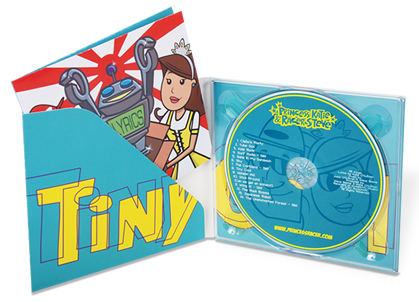
This is a 4 Panel Digipak, It features 4 full colour panels, a plastic CD Tray. Also it is still the same size as a normal Jewel case. 

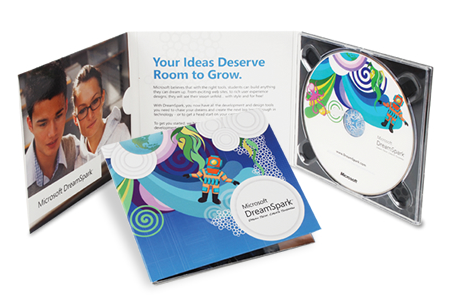
Once again this a 4 panel case but also features a pocket to hold a booklet that can contain the lyrics and credits to the songs on the album or single.

The 6 panel digipak allows for either more artwork or lyrics and credits to be shown. By adding a booklet limited edition pictures, lyrics, credits and band statements to be shown.


This is a 8 panel digipak it allows the designer to add more pictures or one continuous picture to wrap the whole thing. it also allows for some lyrics to be shown on the inside of the album.


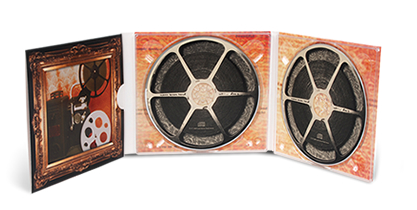
By adding more then one disc, special addition songs and commentaries can be added or even a band DVD to the album.

 Summary

All of styles of digipak are designed to add something extra to the album, some add special artwork throughout the album, some have an added booklet containing song lyrics and credits. Also the incorporation of the disc into the design makes the whole album one of a kind.  

Saturday, 13 October 2012

Surveys - Results

I has been two weeks since I posted my surveys and since then I have posted links on social netwroking sites such as Twitter and Facebook. but unforunatly not many people have done them, because of the lack of data from the surveys, due the lack of people that did them, the data does not give a clear picture of my target audience.

But after some research of groups and forums arond my chosen genre, I have found that the my audience are teenagers from 14 to 19 years old. This is mainly because of punk / rock fashion and culture that are in their day to day lives. I have also found that they mainly listen to bands such as You Me At Six and Evenesance.

Monday, 8 October 2012

Opening shot test

I used some stock footage I had to edit together an opening sequence. I used footage I filmed at home and also when I was doing me shot testing.


When I come to edit my real video I can use this style of editing with in it. Also I have this clip as a reference for when i starting the editing process.


Lighting Test

I experimented with different uses of lighting, I did this in a dance studio which gives me white walls that reflect the light back into the shot. For the lighting I used green screen lights which create a diffused white light.

I placed the two main instruments and a stand in actor to see how the light would effect the shots of them.


From this I have found I will need more lights to flood the shot and create the desired brightness, also to increase the whiteness of the shot, in editing I could change the white balance or contrast.

Wednesday, 3 October 2012

Equipment

To create the varity of shots I will need, I am going to use a collection different equipment. Such as the obvious Camera I will also use a tripod, tracking dolly and fig rig.

Also I will need to use a set of lighting to light the shots correctly, to edit the shot i film i will need a computer running either of the editing programs Pinical or Serif Movieplus X5.

A Computer running the Serif MoviePlus X5
A Computer running Pinical Studio
Tracking Dolly is able to folded up for maximum portability
Tripod to mount the camera
Tripod Mounted on the Tracking Dolly

Shot Testing - Intruments and Singer

I decided I need to try out different shot that i could use with the band and their instuments. This ment i had to collect all of the insturment that I was going to use in the video and use a model to start playing them.

I filmed a varity of differnt shot for all of the instruments including the microphone for the singer. The results of  the this is below.